
If you’re serious about flight simulation, choosing the right gaming PC is essential for an immersive experience. High-performance components, like powerful CPUs and dedicated graphics cards, can make all the difference in rendering detailed environments and maintaining smooth gameplay. As you explore the options, consider what specifications will best suit your needs. Let’s take a closer look at the top choices and what features set them apart.
Logitech G PRO Flight Yoke System for PC

The Logitech G PRO Flight Yoke System is an ideal choice for both budding aviators and seasoned pilots who want to elevate their flight simulation experience. With 75 programmable controls at your fingertips, including a POV hat and 14 button controls, you’ll enjoy versatile operation. The robust stainless steel shaft guarantees smooth, accurate control, enhancing your muscle memory development. Its compatibility with various Windows versions and popular flight simulators means you won’t miss out on any features. Plus, the included desk clamps provide stability for different setups, making it easy to secure and focus on your virtual flights without distraction.
Best For: The Logitech G PRO Flight Yoke System is best for both new and experienced flight simulation enthusiasts looking for realistic controls and versatile operation.
Pros:
- 75 programmable controls allow for extensive customization and functionality during simulations.
- Robust stainless steel shaft ensures durability and smooth operation, enhancing the overall flying experience.
- Compatible with multiple Windows versions and popular flight simulators, providing versatility for various users.
Cons:
- Requires optional software for full functionality with certain flight simulators, which may be an additional step for users.
- Installation may require desk clamps, which could be less convenient for users with limited desk space.
- Relatively high price point compared to basic flight simulation controllers, potentially limiting accessibility for some users.
Thrustmaster T-Flight Hotas One for Microsoft Flight Sim 2024

Designed for both Xbox Series X|S and PC, the Thrustmaster T-Flight Hotas One is perfect for gamers who want an immersive experience in Microsoft Flight Simulator 2024. With 10-bit precision across five axes, including the Z axis, you’ll navigate with accuracy. The setup features 14 buttons, a rapid trigger, and a multidirectional hat switch, all placed ergonomically for ease of use. You can detach the throttle for versatile placement, whether on your lap or desk. Plus, the dual rudder system enhances lateral maneuvering, making it suitable for all aircraft types and flight styles. Elevate your gaming with this high-quality controller!
Best For: Gamers seeking an immersive flight simulation experience on Xbox Series X|S or PC with Microsoft Flight Simulator 2024.
Pros:
- Ergonomic design with adjustable joystick resistance for comfortable long-term use.
- Detachable throttle offers versatile placement options for different gaming setups.
- Dual rudder system allows for enhanced lateral maneuvering, suitable for various flight styles.
Cons:
- Limited compatibility with other flight simulation software outside Microsoft Flight Simulator.
- Additional accessories, like the Thrustmaster TFRP rudder pedals, are sold separately, increasing total cost.
- May require a learning curve for users unfamiliar with flight simulation controls.
Turtle Beach VelocityOne Flight Universal Control System

For avid flight simulation enthusiasts, the Turtle Beach VelocityOne Flight Universal Control System stands out as a top choice, especially for those using Xbox consoles or Windows PCs. This all-in-one system features a true-to-life 180° yoke handle, a modular throttle quadrant with customizable levers, and integrated rudder and brake controls for seamless maneuvering. You’ll appreciate the dedicated pitch trim wheel for precise adjustments and the full-color flight management display for easy configuration. With secure clamping accommodating various setups, this robust control system enhances your experience in Microsoft Flight Simulator 2020 and 2024, making your virtual flying truly immersive.
Best For: Avid flight simulation enthusiasts using Xbox consoles or Windows PCs who seek an immersive flying experience.
Pros:
- True-to-life 180° yoke handle rotation for realistic flight control.
- Modular throttle quadrant with customizable lever handles for personalized setup.
- Integrated rudder and brake controls for seamless maneuvering during flight.
Cons:
- Higher price point compared to basic flight controllers.
- May require a learning curve for new users unfamiliar with flight simulation controls.
- Limited compatibility with non-flight simulation games.
Thrustmaster T16000M FCS Flight Pack (Compatible with PC)

Looking for a versatile flight control system that caters to both left and right-handed users? The Thrustmaster T16000M FCS Flight Pack is your answer. Compatible with PC via USB, it guarantees seamless connectivity on both 32-bit and 64-bit Windows systems. With H.E.A.R.T technology, you’ll enjoy superior precision that remains consistent over time. This fully ambidextrous joystick boasts 16 action buttons, an 8-way Point of View hat switch, and 4 independent axes, including a twist rudder. Plus, T.A.R.G.E.T software allows you to create customized mapping profiles for each game, enhancing your overall flight simulation experience.
Best For: Flight simulation enthusiasts seeking a versatile and precise control system suitable for both left and right-handed use.
Pros:
- Fully ambidextrous design allows for personalized comfort and ease of use for all users.
- H.E.A.R.T technology ensures consistent precision and quality over time, enhancing gameplay experience.
- T.A.R.G.E.T software provides customizable mapping profiles, making it adaptable to various games.
Cons:
- Limited to PC compatibility, which may exclude console gamers from using the system.
- USB connection may require additional ports or hubs if multiple devices are in use.
- Removable components may result in potential loss or misplacement for users who frequently switch configurations.
Thrustmaster TFRP Flight Rudder Pedals for Flight Simulators

If you’re a flight simulation enthusiast craving realistic control, the Thrustmaster TFRP Flight Rudder Pedals are an excellent choice for your gaming setup. Designed for precision, they feature the innovative S.M.A.R.T slide rail system, ensuring smooth movement with industrial-grade aluminum rails. The long range of travel on the rudder axis allows for precise maneuvers, while the self-centering design strikes a perfect balance between smoothness and resistance. Compatible with PC, Xbox One, and PlayStation 5, these pedals cater to various flight simulation setups, making them an essential addition for anyone serious about their flight experience.
Best For: Flight simulation enthusiasts seeking realistic control and precision in their gaming experience.
Pros:
- Features the innovative S.M.A.R.T slide rail system for smooth movement.
- Long range of travel on the rudder axis allows for precise maneuvers.
- Compatible with PC, Xbox One, and PlayStation 5 for versatile setups.
Cons:
- May require additional calibration for optimal performance on different platforms.
- Lacks advanced features found in higher-end rudder pedals.
- Limited adjustability options compared to some competing models.
Thrustmaster T-Flight Stick X (Compatible with Windows PC)

The Thrustmaster T-Flight Stick X stands out as an exceptional choice for flight simulation enthusiasts seeking precision and control. This plug-and-play device offers a quick and hassle-free installation, letting you dive right into your virtual cockpit. With an extremely precise joystick and adjustable resistance control, you’ll experience unmatched handling. The rotating handle features a built-in locking system for rudder control, while the airbrake trigger and multidirectional hat enhance your maneuvering capabilities. Comfort is key; enjoy the ergonomic throttle lever and wide hand rest. Plus, with customizable settings stored in internal memory, you can tailor your experience like never before.
Best For: Flight simulation enthusiasts looking for an affordable, high-quality joystick with precision and customizable features.
Pros:
- Plug & Play design allows for quick and easy installation without the need for complicated setup.
- Adjustable resistance control provides personalized handling and precision during flight simulations.
- Ergonomic design with a weighted base and comfortable hand rest enhances user comfort during long gaming sessions.
Cons:
- Limited compatibility, as it is only designed for Windows PC users.
- Some users may find the joystick’s size and weight to be a bit bulky for smaller gaming setups.
- Internal memory for settings may not be sufficient for advanced users requiring multiple profiles.
PXN Flight Simulator Controls 2113 Wired Flight Stick for PC
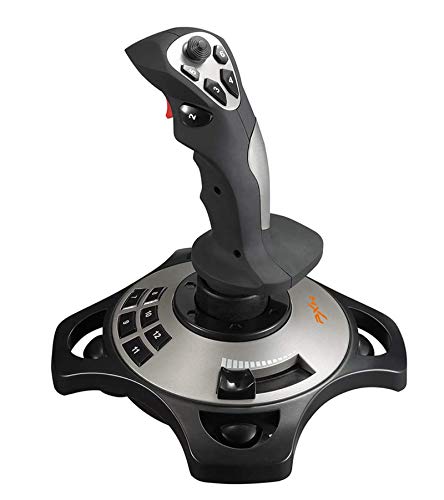
For serious flight simulation enthusiasts, the PXN Flight Simulator Controls 2113 Wired Flight Stick offers an immersive experience with its advanced vibration functionality. Designed for PC compatibility, it works seamlessly with Windows 7 through 10, ensuring you can engage in popular games like Microsoft Flight Simulator 2020 and X-Plane 11. With four axes, 12 programmable buttons, and an ergonomic design, you’ll enjoy precise control during your flights. Plus, the PXN-2113 driver software lets you customize settings to suit your gameplay style. Just plug it in, and you’re ready to take off into the virtual skies!
Best For: Serious flight simulation enthusiasts seeking an immersive and customizable flying experience on PC.
Pros:
- Offers advanced vibration functionality for a more realistic simulation experience.
- Features 12 programmable buttons and four axes for precise control and customization.
- Ergonomic design ensures comfort during extended gaming sessions.
Cons:
- Limited compatibility as it only works with Windows PCs and does not support Mac or gaming consoles.
- Vibration effects may require adjustment in the driver for optimal performance.
- Some users may find the setup process and driver installation challenging.
Logitech G X52 Flight Control System – Standard Packaging
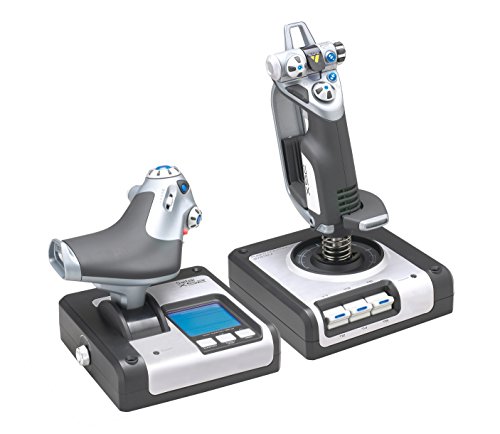
Elevate your flight simulation experience with the Logitech G X52 Flight Control System, designed specifically for enthusiasts seeking precision and control. This system features an advanced multi-function display (MFD) and dedicated MFD buttons, allowing for interactive flying. The joystick boasts a precision centering mechanism and non-contact technology, ensuring accuracy in every maneuver. Enjoy enhanced control with constant spring force and a progressive throttle that includes detents for Afterburner and Idle. Compatible with various Windows versions, the X52 is perfect for immersing yourself in realistic flight simulations. Get ready to take your virtual piloting to new heights!
Best For: Flight simulation enthusiasts seeking precision and enhanced control in their virtual piloting experience.
Pros:
- Advanced multi-function display (MFD) for interactive functionality during flights.
- Joystick features precision centering and non-contact technology for accurate maneuvers.
- Compatible with a wide range of Windows operating systems, ensuring versatility.
Cons:
- May be considered expensive for casual gamers or beginners.
- Setup and configuration may require some technical knowledge.
- Limited compatibility with non-Windows operating systems.
Thrustmaster SimTask FarmStick Joystick for PS5 and PC

Looking for a joystick that enhances your farming simulation experience? The Thrustmaster SimTask FarmStick Joystick is your perfect companion for PS5 and PC gaming. Designed specifically for Farming Simulator 25, it boasts a 3-axis design with 6 buttons, a thumbwheel, and more, offering up to 33 action buttons for precise control of your machinery. Its H.E.A.R.T technology guarantees surgical accuracy, making every operation feel real. Plus, it supports ambidextrous use, allowing you to pair it with a racing wheel or another joystick. With a simple Plug & Play setup, you’re ready to plunge into immersive farming fun!
Best For: Enthusiasts of farming and construction simulation games seeking an immersive and precise control experience.
Pros:
- Offers up to 33 action buttons for extensive control over machinery.
- H.E.A.R.T technology ensures high precision and accuracy in operations.
- Ambidextrous design allows for versatile use with a racing wheel or another joystick.
Cons:
- Requires a separate steering wheel for optimal use.
- Specifically designed for Farming Simulator 25, limiting its versatility with other games.
- May have a learning curve for new users unfamiliar with joystick controls.
Thrustmaster Sol-R1 Flight Joystick for PC

The Thrustmaster Sol-R1 Flight Joystick is an exceptional choice for serious flight simulation enthusiasts who demand precision and responsiveness in their gaming experience. With its Hall Effect Technology, you’ll enjoy ultra-precise control, perfect for space flight scenarios. Featuring 44 action buttons, including 21 on the stick, you can execute multiple actions effortlessly. Its H.E.A.R.T. technology provides 16-bit accuracy across all axes, ensuring your movements are spot-on. Plus, the ergonomic design caters to both left and right-handed users, enhancing comfort during those long sessions. The backlit joystick, inspired by sci-fi classics, integrates seamlessly with other Thrustmaster products for a complete setup.
Best For: Serious flight simulation enthusiasts who seek ultra-precise control and multiple action capabilities in their gaming experience.
Pros:
- High precision with Hall Effect Technology and H.E.A.R.T. for 16-bit accuracy.
- Ergonomic design with interchangeable wrist and thumb rests for enhanced comfort.
- Wide compatibility with the Thrustmaster ecosystem, allowing integration with other products.
Cons:
- Limited to PC users, as it is not compatible with consoles.
- Steep learning curve for beginners due to the multitude of buttons and controls.
- Potentially high price point compared to standard gaming joysticks.
Factors to Consider When Choosing a Gaming PC for Flight Simulator
When you’re choosing a gaming PC for Flight Simulator, several key factors come into play. You’ll need to focus on hardware specifications, including the graphics card, processor, memory, and storage options to guarantee smooth performance. Don’t forget about the cooling system, as it plays an essential role in maintaining efficiency during long flights.
Hardware Specifications Requirements
Choosing the right hardware specifications for a gaming PC dedicated to flight simulators can greatly enhance your gaming experience. Start with a powerful CPU, like an Intel i5/i7 or AMD Ryzen 5/7, to handle complex simulations efficiently. Next, make sure you have a dedicated graphics card with at least 4GB of VRAM to render detailed environments smoothly. For RAM, aim for 16GB to 32GB to support the demanding nature of these games. Storage is also key; opt for an SSD for quicker load times, while a larger HDD can accommodate add-ons and updates. Finally, don’t overlook an effective cooling system to prevent overheating during those long flights and maintain peak performance.
Graphics Card Importance
A powerful graphics card plays a pivotal role in how flight simulators perform and look. It’s vital for rendering detailed, realistic environments that feature high-resolution textures and complex lighting effects. With a capable GPU, you’ll experience markedly improved frame rates, resulting in smoother performance and less motion blur during those high-speed maneuvers. Flight simulators often leverage advanced graphical features like anti-aliasing and ambient occlusion, so you’ll need a strong graphics card to maintain performance without compromise. If you’re diving into VR technology, it’s even more essential to choose a high-end GPU to guarantee a seamless, immersive experience. Ultimately, your graphics card choice will directly impact the visual fidelity, cockpit clarity, and realism of weather effects in your simulation.
Processor Performance Impact
Although many gamers focus on graphics cards, the processor’s performance is equally essential for an immersive flight simulator experience. The clock speed, measured in GHz, directly impacts frame rates and overall gameplay smoothness. Higher speeds mean better performance. Opt for multi-core processors, like quad-core or higher, to enhance multitasking and handle complex calculations involved in realistic flight physics. Don’t overlook single-threaded performance, as many flight simulators aren’t fully optimized for multi-threading; faster single-core speeds lead to more responsive gameplay. Additionally, consider the choice between Intel and AMD processors, as compatibility with specific flight simulator software can vary. Finally, keep an eye on the thermal design power (TDP); lower TDP CPUs may throttle under load, affecting your experience.
Memory and Storage Needs
When diving into the world of flight simulators, understanding memory and storage needs is vital for a seamless experience. You’ll want a minimum of 16GB RAM to guarantee smooth performance during those complex simulations. High-fidelity games can take up 50GB or more, so having ample SSD or HDD space is essential. Opt for a solid-state drive (SSD) to enjoy faster load times, cutting down on wait periods when starting the simulator or switching scenarios. Be certain to install your operating system and flight simulator software on the primary drive, while using additional storage for add-ons and scenery packs. Finally, keep future needs in mind; expansions and updates can increase your memory and storage requirements over time.
Cooling System Efficiency
Choosing an efficient cooling system is vital for maintaining peak performance while flying through expansive virtual skies. Opt for liquid cooling or high-performance air cooling to prevent thermal throttling during long gaming sessions. Aim to keep your CPU and GPU temperatures below 80°C to guarantee ideal performance without overheating. Proper airflow within your case, achieved by strategically placed fans, enhances cooling efficiency and extends the lifespan of your components. Don’t forget to take into account noise levels; quieter systems can create a more immersive experience without distracting sounds. Regular maintenance, like cleaning dust filters and guaranteeing unobstructed airflow, is essential for keeping your cooling system effective over time. Invest in a solid cooling solution to elevate your flight simulation experience.